As you should know, a post on Jekyll is created by making a new .md file in the _posts folder.
Then you name it as YEAR-MONTH-DAY-title.MARKUP
Where YEAR is a four-digit number, MONTH and DAY are both two-digit numbers, and MARKUP is the file extension representing the format used in the file, md for Markdown. For example, the following are examples of valid post filenames:
2024-08-01-article-1.md
2024-08-01-article-2.md
By default, Jekyll uses the date you use in the filename, so 2024-08-01-article-2.md is read by Jekyll, and then when it displays the posts, it uses that date.
The Problem with Same-Date Posts
However, your post should also have a date field in the YAML front matter. You will find that when you create a new blank Jekyll site, it includes that field. This is a best practice, especially for people who may post more than once a day and care about how the posts get displayed chronologically.
Basic Date Format
Using the date field, you can use this format:
date: 2024-08-01But it’s important to include the timezone for consistency:
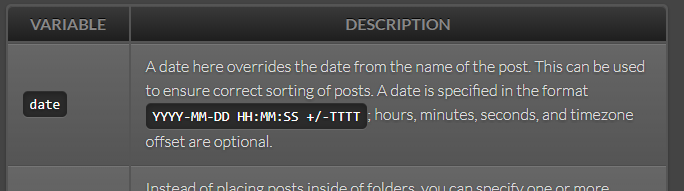
Extended Date Format with Time
In our case, that does not help a lot because you want more granularity, so you can extend the date format like this, which includes HH:MM:SS +TTTT:
date: 2024-08-01 02:05:54 +0200Practical Example
Here is what you should minimally do so you get the sorting right, assuming article 1 was written first and article 2 was written second:
2024-08-01-article-1.md:
---
layout: single
title: article-1
date: 2024-08-01 02:01:00 +0200
excerpt:
seo_title:
seo_description:
categories:
tags:
---
The content goes here...
2024-08-01-article-2.md:
---
layout: single
title: article-2
date: 2024-08-01 02:02:00 +0200
excerpt:
seo_title:
seo_description:
categories:
tags:
---
The content goes here...
Key Points to Remember
- Filename dates are not enough - Jekyll needs YAML front matter dates for proper sorting
- Include timezone information - Use the
+TTTTformat for consistency - Use precise timestamps - Include hours, minutes, and seconds when posting multiple times per day
- Maintain chronological order - Earlier posts should have earlier timestamps
- Be consistent - Use the same timezone format across all posts
This approach ensures that your Jekyll site displays posts in the correct chronological order, even when multiple posts share the same publication date.